customer service flowchart for restaurants
Serving good food isn't enough — you also need to provide good service. No restaurant will succeed if the dishes are great but the experience is terrible. After all, what good is eating well if you have to wait hours for your order?
According to the survey O Futuro do Food Service 2022, developed by Fispal Food Service, service is the second aspect customers value most in a restaurant, behind only food quality. Além disso, a agilidade também aparece na lista:
- Food quality (45.91%)
- Service (18.96%)
- Value for money (12.00%)
- Atmosphere (10.26%)
- Speed (6.09%)
- Menu variety (5.57%)
In other words: having efficient service is essential. To help with that, it's a good idea to create a customer service flowchart for your restaurant. Learn how to do it below!
What is a customer service flowchart?
A flowchart is a schematic representation of a process.
In it, the steps are illustrated with geometric symbols — rectangles, diamonds, triangles —, connected to one another in a chain. This way, it defines a flow of actions and indicates in what order they should be carried out and by whom.
A customer service flowchart for a restaurant, therefore, is a tool used to organize that process and guide the team. Ele prevê as principais solicitações dos clientes em diferentes situações ou contextos e aponta como proceder.
What is a customer service flowchart in a restaurant used for?
In a restaurant, it's very important that customer service follows a standard to ensure quality. Quando há processos bem definidos, são maiores as chances de toda a equipe proceder da maneira adequada.
Picture a full house, with every table taken and lots of orders going out. Without organization and instructions, service will likely be slower and prone to mistakes. To avoid that problem, the flowchart is the ideal tool.
A customer service flowchart in a restaurant is used to:
- Organize the steps of the customer service process
- Maintain a high quality standard
- Guide the team in responding to different customer demands
- Speed up service, reducing wait times
- Facilitate the training of new employees
Now that you know the benefits of the flowchart, learn how to create one for your restaurant below.
How to create a customer service flowchart for restaurants
As we saw, a flowchart is the visual representation of a process. So, to create a customer service flowchart for your restaurant, you first need to understand how your business's processes work.
This can vary depending on the business model and the technologies used — a restaurant with a digital menu will have a very different service flowchart from one that uses a paper menu, for example.
So keep in mind that this tool should be customized for your operation. Check out our tips below and start sketching right now!
1. Define the type of service
Naturally, you should create a different flowchart for each type of service: in person, by phone, on WhatsApp, delivery apps, etc.
After all, contact with the customer is different in each of these types, as are the demands, questions and possible problems.
2. Map the process
Considering the type of service you chose, list the steps of the process and lay out the flow of actions. Tip: count on your team's help for this task, so nothing slips through the cracks.
To build the flow, think first about the broad steps and then the specific ones. Describe the activities related to each of them.
Let's use in-person service as an example:
- Reception
- Menu
- Order
- payment
- Loyalty program
- Satisfaction survey
3. List contexts and actions
After listing all the process steps related to service, list the possible contexts and actions related to customer demands at each step.
For example, at the reception step, there are three possibilities:
- Context 1: There are tables available
Action: The person in charge takes the customer to the chosen table - Context 2: There are no tables available and the customer decided to wait
Action: Take their details and add them to the waiting list. Give the wait time, make the customer comfortable in the reception area. - Context 3: There are no tables available and the customer decided to leave
Action: Thank them for their understanding, give them the contact for reservations and offer a courtesy for their next visit
4. Define who's responsible
Each service step should have a defined person in charge. For example:
- the reception person checks which tables are available
- the waiter takes the order
- the cashier processes the payment
- the manager responds to complaints
5. Add supporting information
It's important for the flowchart to be clear and objective about the actions that must be carried out and how they should be carried out. It should contain all the instructions the employee needs to understand the correct procedure.
So after drawing the flow, include more specific information, such as how to behave and what to say in certain situations.
6. Check the flowchart in practice
When you're done, it's time to test! Present the flowchart to your employees, run a training session and see whether the process flows the way it was designed. If necessary, make adjustments.
Remember: a restaurant's customer service flowchart is unique and should be adapted to each operation. This guide is just a reference for you to draw your own! To wrap up, check out a complete flowchart template below!
Template: complete customer service flowchart restaurant
We've prepared a customer service flowchart template for restaurants. You can adapt it to your process, removing or adding steps and actions. Check it out:
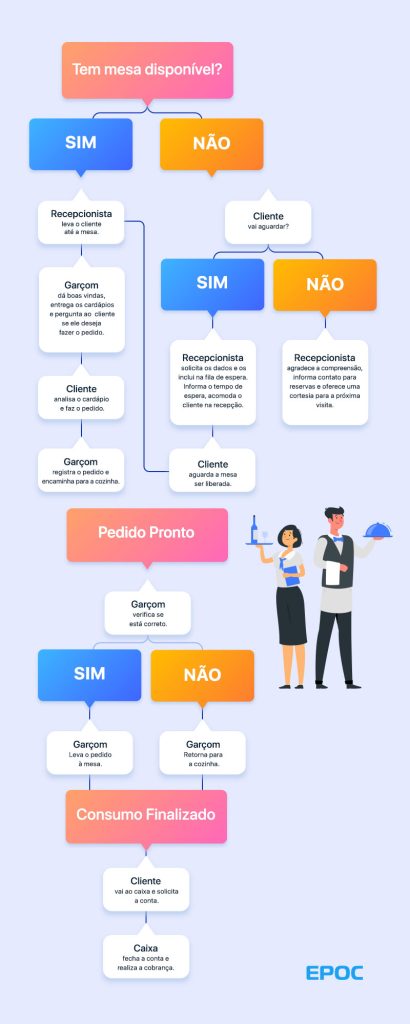
One last tip: there are several tools available that make creating the flowchart easier, such as Miro and MindMeister. Com elas é muito mais fácil criar um esquema visual atrativo para compartilhar com os funcionários!
See more tips to improve customer service
So, have you sketched your customer service flowchart yet? It will certainly help improve your restaurant's customer service, making the operation faster and leaving your customers more satisfied.
To learn more about this topic, check out more 8 tips to serve a customer well at a restaurant or bar and download our Customer Service Training Guide!