What is a POS system? Complete guide

Do you know what is a POS system? It is part of the daily routine of every business, and you may not have even noticed.
The POS is a system used to manage sales, take payments, issue invoices, control inventory, analyze financial activity, among many other tasks.
That is why it is a fundamental part of the operation of restaurants, bars and other retail stores.
In this article, understand what a POS system is, how it works, what the types are, the advantages and much more. Read on!
POS system: what is it and what is it for?
To understand what a POS system is, let's start from the beginning – by actually understanding What POS means. A sigla quer dizer “Ponto De Venda”, e é uma versão “abrasileirada” do termo em inglês POS (Point Of Sale).
In practice, this means the POS is the place where purchases are completed. It is where customers pay, the business records sales and carries out the internal processes related to them (such as issuing invoices, deducting from inventory, among others).
From that description alone you can already see how important a POS system is, right? It is a vital part of the sales process and of the business's financial management. But that is not all it does.
The POS systems available on the market are very complete and specialized for different business models. They offer different features that make it possible to automate and optimize other operational processes.
In a restaurant, for example, beyond sales management, the POS also serves to manage tabs and tables, enter orders and track how production is progressing, register products and handle inventory control, among other features we will see later on.
How does a POS system work?
The POS works as a combination of software and hardware. Ou seja: de sistemas e equipamentos.
A POS can be made up of various equipment, such as computers, cash registers, barcode scanners, invoice printers, payment machines, among others.
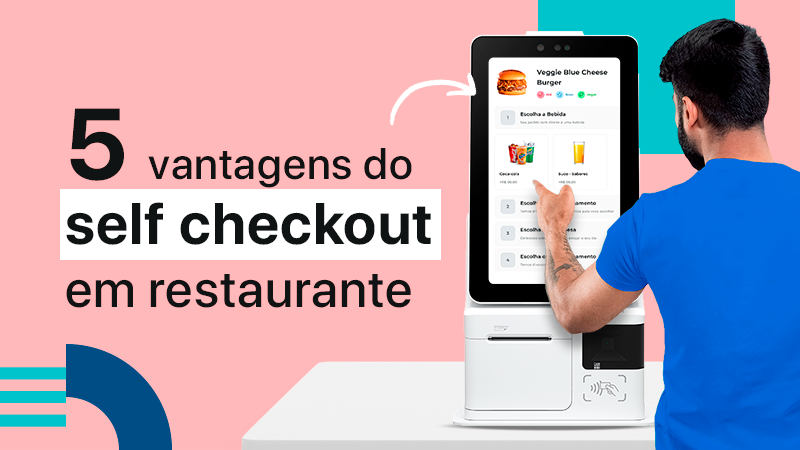
And there are also more modern versions that only need a smartphone, tablet, Self-Service Kiosk ou card machine.
The POS system is installed on this equipment, and it is nothing more than the software or app used to carry out the operations and tasks, such as recording sales, issuing invoices, updating inventory, sending orders to the kitchen, among other functions.
With that in mind, there are several types of POS, using different equipment and software. Learn more about it below!

What are the types of POS?
The Point of Sale can be classified in several ways: there is the fixed POS and the mobile POS, the online POS and the Offline POS. Confira mais sobre as diferenças de cada um logo abaixo!
Fixed POS
A fixed POS is the more “traditional” type, usually made up of a computer, a cash register, a payment terminal and an invoice printer.
It gets that name because it can't be moved easily. It's usually located at a counter near the entrance of the establishment.
That's why the waiter or the customer has to walk over there to record orders, close the bill and make the payment.
mobile pos
On the other hand, a mobile pos is one that doesn't need to stay in a fixed spot, since it runs on mobile devices such as smartphones, tablets, laptops, kiosks or card machines.
The big advantage is that the waiter gains mobility during service, since he can take the POS right to the customer's table and carry out every operation there. Service is faster and the customer enjoys more convenience.
Offline POS
The offline POS uses a local server to run the software and store the data. That lets it work without depending on an internet connection.
So you need your own infrastructure to guarantee the security and stability of the operation, and the system can only be accessed on site.
Online POS
The online POS is accessed over the internet and the data is stored in the cloud (through Cloud Computing). That's why it's also called a cloud POS.
It's this technology that makes it possible to use the system without investing in your own infrastructure. It also lets you use mobile devices, manage everything remotely and integrate data from multiple locations.
To avoid headaches, a contingency system is used in case the internet connection goes down. That way, the operation keeps running with no interruptions or data loss.
What are the main POS features?
You already know what a POS system is, how it works and what its types are. Now it's time to understand the main features it can offer your establishment. Read on!
Checkout
The best-known feature of the POS is undoubtedly the Checkout – so much so that some people think the two are synonyms. However, as you've already seen, a Point Of Sale is much more than that, even though the checkout is indeed one of its most important features.
A checkout system within the POS is the one responsible for completing a purchase. É o famoso “caixa”, onde clientes mostram suas contas/comandas, realizam o pagamento e recebem seus comprovantes.
So it's essential to have a POS checkout in your bar, restaurant or nightclub – at least if you want to get paid for the products you sell.
It's also through this feature that, at the end of the day, you close the register, view every product that was sold and check your establishment's revenue.
Issuing invoices
And it's at the checkout that the invoices handed to customers are issued.
Today, customers often prefer electronic versions of invoices, but printing receipts is still quite popular.
With a POS you can handle this process simply and quickly, right after every sale.
This not only ensures that your establishment complies with tax rules and legislation, but also conveys transparency and credibility to your customers.
Controle de estoque
When integrated with an ERP, the POS also helps optimize the operation through inventory control.
That's because these two tools ensure that, as soon as an order is placed and the purchase completed, the system deducts the ingredients from your inventory.
This speeds up the whole process and keeps you from being caught off guard when a popular item on your menu is no longer available – and you end up losing sales.
In fact, the POS can even send alerts when an item is about to run out in inventory.
Order management
Another essential feature in a restaurant POS is entering and tracking orders.
Through the system, the waiter takes the order, makes changes according to customer preferences and sends it straight to a production printer or KDS monitor in the kitchen or bar to be prepared.
As a result, entering orders and tracking their production status are automated, preventing mistakes and making your service team's work far more productive and efficient.
Integrating other areas of the operation
When combined with an ERP, the POS can also integrate other areas of your operation.
For example, a restaurant POS can manage delivery orders. To do that, you just need to integrate the apps for this kind of service and the orders placed on them will be recorded automatically in your POS.
The same can happen if your establishment has a data analytics and financial control tool.
That way, the POS can automatically collect information such as average ticket, most profitable hours, busiest days, best-selling items, among other data.

6 benefits of the POS for restaurants
With so many features, the benefits of the POS are far from few. This tool has the potential to improve your operation, maximize profits and even cut costs.
Check out below the main benefits of the POS system for restaurants!
1. More financial security
You've very likely been through this: when closing the register at the end of the day, you run into accounts that don't add up, numbers that don't match and the question of what caused that difference – a mistake or bad intentions?
With a complete POS you'll never have to deal with that again. The tool accounts for every sale, calculates the amounts and only allows the register to be closed when the numbers match, optimizing cash control.
On top of that, every user has to log their access when using the system, which helps identify who's responsible for mistakes or tampering.
2. Optimizing the operation
Using an efficient POS system also helps optimize the operation as a whole, since it automates several processes, from the order to the payment.
For example: the waiter enters the order and it goes straight to production. That way, he doesn't need to walk to the kitchen to place the order, cutting down trips across the dining room and boosting productivity.
The POS also helps you control tables and tabs, recording everything each customer consumed simply and quickly. That way, there's no confusion in production or billing errors.
On top of that, when an order is placed in the POS, the items are automatically deducted from inventory. If recipe cards and recipes are registered, this control can be extremely precise, accounting for even a spoonful of sugar.
Finally, the system lets you take payments quickly and securely, recording payment methods, issuing invoices and ensuring greater efficiency in every tax and financial process.
3. Improving the customer experience
This benefit is a result of the previous one. The math is simple: a venue with fast, efficient service + an easy, secure payment experience = happy customers.
Improving the customer experience is a goal for every business owner, since it's far cheaper to bring an existing customer back than to win a new one.
An efficient POS helps deliver quality service and a hassle-free payment. That contributes to customer satisfaction and loyalty.
4. Cutting costs
With a POS for restaurants or bars you also cut costs and expenses. That's because, as you've already seen, the system helps optimize financial management and prevents money from “getting lost” in the cash flow.
On top of that, optimizing the operation prevents raw material waste and the purchase of unnecessary materials (since you have efficient inventory control, you don't end up with products “sitting around” in it for no reason).
Finally, by using a POS built into an ERP you reduce your investment in technology infrastructure and in different systems and tools.
That way, with just one system, you manage sales, production, service, payments, inventory, cash and much more.
5. Increasing sales
The only thing better than cutting expenses is increasing profits. And with a POS system you get exactly that.
The tool optimizes processes and increases your restaurant's service capacity. As a result, you can shorten table turnover time and serve more customers in a single day.
There are also features built into the POS that help the waiter suggest add-on items, encouraging consumption and raising the average ticket.
What's more, with a more efficient operation and an unbeatable service experience, your bar or restaurant tends to grow its customer base and, with that, reach ever greater profitability.
6. Data-driven management
A POS system collects valuable data that's essential to support decision-making.
You can find out which menu items sell more or less, what your customers' demographic profile and consumption preferences are, identify seasonality and busy days, among many other aspects of your business.
With all this data in hand, you drop the gut feelings and can map out far more effective strategies, such as promotions on popular items or special programming to draw customers in during slow periods.
You can also use the information to negotiate better prices with suppliers, plan your purchases, optimize inventory management and seek partnerships and investment to drive your restaurant's growth.

How to choose a POS?
You've probably realized that having a POS in your establishment isn't just a differentiator, but is also essential to win more customers and get ahead of the competition – which is very likely already using this tool – right?
When it comes to choosing a POS, there's no magic formula. You have to take into account your infrastructure, your target audience and the specific features and functions that will make a difference for your establishment.
To help you find a POS system, here are some aspects to keep in mind at that moment. Take a look!
Leia também: How to choose the best restaurant system?
1. Mobile POS
Go for mobile POS systems that run in the cloud. They fit the more modern behavior of today's customer, who wants speed and autonomy.
A mobile POS operates online and in real time, which also helps minimize infrastructure costs and brings more flexibility to the operation.
2. ERP integration
As you've already seen, the benefits of a POS are amplified when it works together with an ERP. It integrates several tools to speed up the operation and make managing the business easier.
So, choose a POS tool that integrates with an ERP management system or that's already part of one of those solutions.
3. Support
Another point that's sometimes overlooked and usually comes at a high price: support – or rather, the lack of it.
Even the most complete software can run into problems. Likewise, even the best-trained, most experienced employee can struggle or make mistakes when operating the POS.
And that's exactly when you'll realize how much good technical support matters. So choose a POS system that offers fast, efficient support available whenever you need it.
4. Flexibility for your operation
Make sure the system you choose is compatible with your restaurant's operational processes and flexible enough for you to make adjustments in the future, if needed.
For example: if you do table service, it's important that the POS lets you enter orders by table, split sections among the waiters and track occupancy.
If you work with tabs, direct sales or delivery, you should also have specific features for that.
Go for a complete POS, so your operation isn't limited by the system and you can make changes whenever you want.
5. Ease of use
Finally, another important aspect is the system's usability. Choose a system with a modern interface that's easy to operate.
Besides cutting training time for your team and freelancers, this speeds up service, since actions can be completed in just a few screens and clicks.
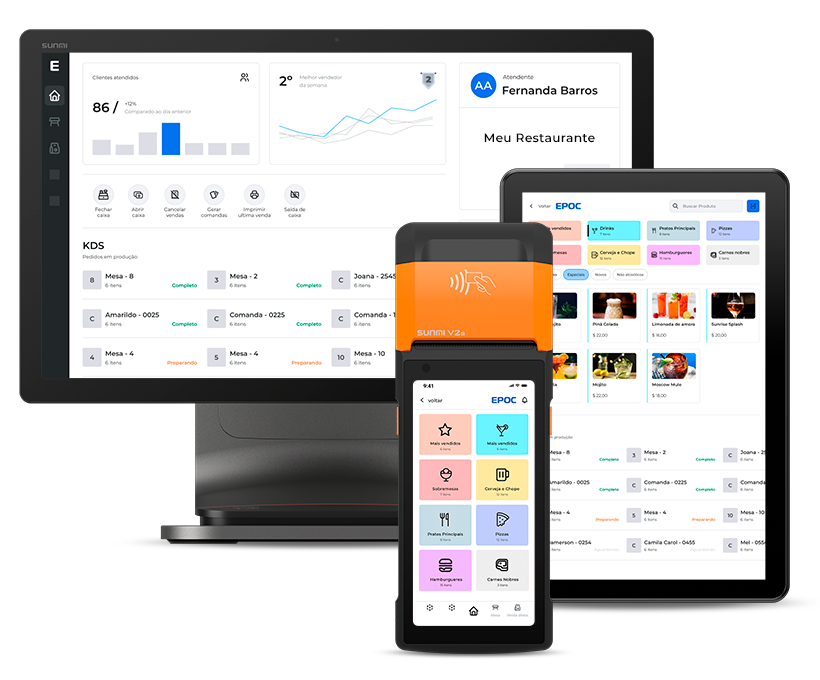
EPOC POS: the best solution for your restaurant
Now that you understand what a POS system is and all its advantages, how about getting to know EPOC POS?
EPOC is a restaurant management system with all the features you need to deliver fast service, increase operational efficiency and simplify management.
We offer a PDV that's fast and easy to use. It handles every type of operation: standard and split tables, individual tabs and counter service. It's also integrated with ERP, KDS, digital menu and self-service solutions. Want to know how we can help your restaurant? Fale com nossos consultores!